
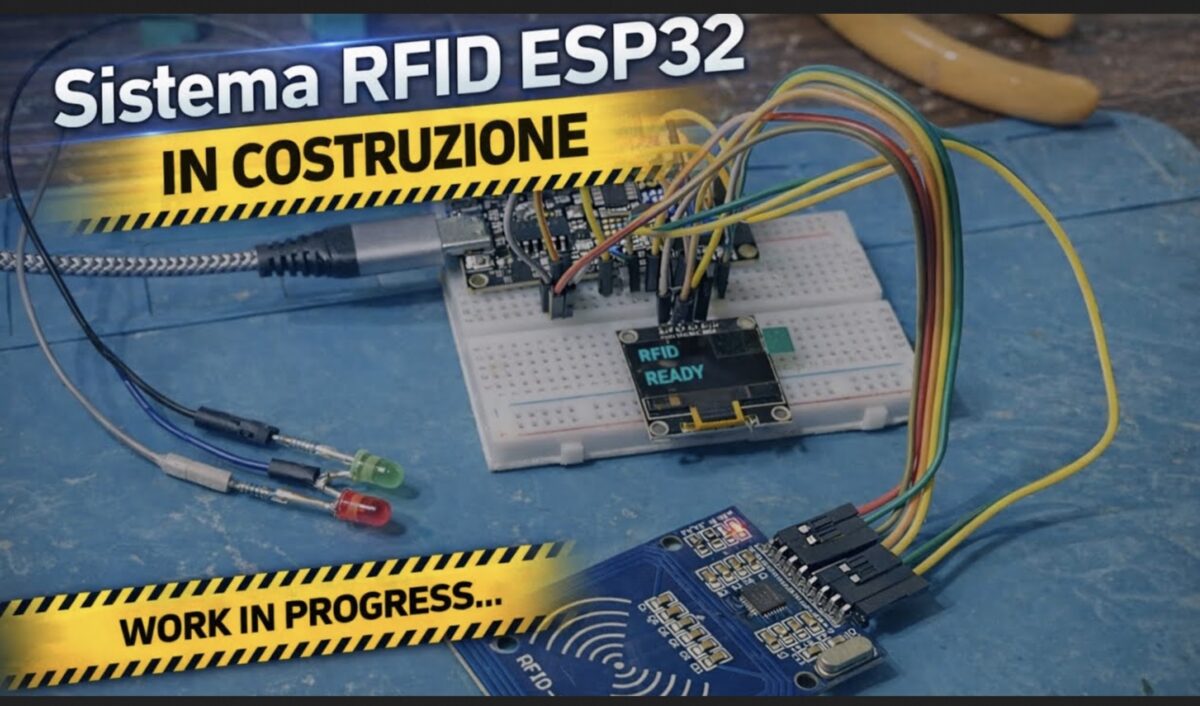
✨ Sistema RFID con ESP32, RC522, OLED, Relè, LED e Buzzer

Una guida completa per realizzare un accesso elettronico affidabile, elegante e totalmente integrato con ESPHome.

🔧 Componenti necessari

  • ESP32 DevKit
  • Lettore RFID RC522 (SPI)
  • Display OLED SSD1306 128×64 (I2C)
  • Modulo relè 5V
  • LED verde + LED rosso (con resistenze 220–330 Ω)
  • Buzzer attivo a 3 pin
  • Alimentazione 5V
  • Cavi dupont

🧩 Collegamenti elettrici

Tabella completa dei collegamenti ESP32 → Componenti

RC522 (SPI)

Funzione RC522Pin RC522Pin ESP32
AlimentazioneVCC3.3V
MassaGNDGND
ResetRSTGPIO22
SS / SDASDAGPIO5
SCKSCKGPIO18
MOSIMOSIGPIO23
MISOMISOGPIO19


Display OLED SSD1306 (I2C)

Funzione OLEDPin OLEDPin ESP32
AlimentazioneVCC3.3V
MassaGNDGND
SDASDAGPIO21
SCLSCLGPIO17


LED di stato

LEDAnodo → ESP32Catodo →
VerdeGPIO14 (via resistenza)GND
RossoGPIO27 (via resistenza)GND


Relè cancello

FunzionePin modulo relèPin ESP32
SegnaleINGPIO32
AlimentazioneVCC5V
MassaGNDGND


Buzzer attivo 3 pin

FunzionePin buzzerPin ESP32
AlimentazioneVCC5V
MassaGNDGND
SegnaleI/OGPIO26

💡 Funzionamento del sistema

  • Quando un tag RFID viene avvicinato, l’ESP32 legge l’UID tramite il modulo RC522.
  • Se il tag è autorizzato:
    • Il relè invia un impulso per aprire il cancello
    • Il LED verde si accende per 8 secondi
    • Il display mostra “ACCESSO CONSENTITO”
    • Il buzzer emette due beep
  • Se il tag non è autorizzato:
    • Il LED rosso si accende per 8 secondi
    • Il display mostra “ACCESSO NEGATO”
    • Il buzzer emette tre beep rapidi

🧠 Codice ESPHome completo e funzionante

esphome:
  name: esphome-web-568b34
  friendly_name: Esp32 RFID
  min_version: 2025.11.0
  name_add_mac_suffix: false
  on_boot:
    priority: -100
    then:
      - switch.turn_on: rele

esp32:
  variant: esp32
  framework:
    type: esp-idf

logger:
  level: DEBUG

api:

ota:
  platform: esphome

wifi:
  ssid: "xxx"
  password: "sxxxxx"

spi:
  clk_pin: 18
  mosi_pin: 23
  miso_pin: 19

rc522_spi:
  cs_pin: 5
  reset_pin: 22
  update_interval: 1s
  on_tag:
    then:
      - lambda: |-
          std::string uid = x;

          uint32_t now = millis();
          if (now - id(ultimo_lettura) < 2000) {
            return;
          }
          id(ultimo_lettura) = now;

          ESP_LOGI("rfid", "Tag rilevato: %s", uid.c_str());

          id(ultimo_tag).publish_state(uid);

          for (auto &t : id(tag_autorizzati)) {
            if (t == uid) {
              ESP_LOGI("rfid", "Accesso consentito");

              id(accesso_consentito).publish_state(true);
              id(accesso_negato).publish_state(false);

              id(led_ok).execute();
              id(display_ok).execute();

              return;
            }
          }

          ESP_LOGW("rfid", "Accesso negato");

          id(accesso_consentito).publish_state(false);
          id(accesso_negato).publish_state(true);

          id(led_ko).execute();
          id(display_ko).execute();

globals:
  - id: tag_autorizzati
    type: std::vector<std::string>
    initial_value: '{"67-89-90-C9", "67-FA-0A-c9"}'

  - id: ultimo_lettura
    type: uint32_t
    initial_value: '0'

output:
  - platform: gpio
    pin: 14
    id: led_verde_pin

  - platform: gpio
    pin: 27
    id: led_rosso_pin

script:
  - id: led_ok
    then:
      - switch.turn_on: buzzer
      - delay: 120ms
      - switch.turn_off: buzzer
      - delay: 120ms
      - switch.turn_on: buzzer
      - delay: 120ms
      - switch.turn_off: buzzer

      - switch.turn_off: rele
      - delay: 1s
      - switch.turn_on: rele

      - light.turn_on: led_verde
      - delay: 8s
      - light.turn_off: led_verde
      - lambda: |-
          id(accesso_consentito).publish_state(false);

  - id: led_ko
    then:
      - switch.turn_on: buzzer
      - delay: 80ms
      - switch.turn_off: buzzer
      - delay: 80ms
      - switch.turn_on: buzzer
      - delay: 80ms
      - switch.turn_off: buzzer
      - delay: 80ms
      - switch.turn_on: buzzer
      - delay: 80ms
      - switch.turn_off: buzzer

      - light.turn_on: led_rosso
      - delay: 8s
      - light.turn_off: led_rosso
      - lambda: |-
          id(accesso_negato).publish_state(false);

  - id: display_ok
    then:
      - display.page.show: page_ok
      - delay: 8s
      - display.page.show: page_idle

  - id: display_ko
    then:
      - display.page.show: page_ko
      - delay: 8s
      - display.page.show: page_idle

light:
  - platform: binary
    id: led_verde
    name: "LED Verde RFID"
    output: led_verde_pin

  - platform: binary
    id: led_rosso
    name: "LED Rosso RFID"
    output: led_rosso_pin

switch:
  - platform: gpio
    id: rele
    name: "Relè Cancello"
    pin:
      number: 32
      inverted: true
    restore_mode: ALWAYS_ON

  - platform: gpio
    id: buzzer
    name: "Buzzer RFID"
    pin:
      number: 26
    restore_mode: ALWAYS_OFF

text_sensor:
  - platform: template
    id: ultimo_tag
    name: "Ultimo TAG RFID"
  - platform: wifi_info
    ip_address:
      name: "ESP32 IP Address"
    ssid:
      name: "ESP32 WiFi SSID"
  - platform: version
    name: "Firmware ESPHome"

button:
  - platform: restart
    id: riavvia_esp
    name: "Riavvia Proxy ESP32"

binary_sensor:
  - platform: template
    id: accesso_consentito
    name: "Accesso RFID Consentito"

  - platform: template
    id: accesso_negato
    name: "Accesso RFID Negato"

i2c:
  sda: 21
  scl: 17
  scan: true

font:
  - file: "gfonts://Roboto"
    id: font1
    size: 20

display:
  - platform: ssd1306_i2c
    model: "SSD1306 128x64"
    address: 0x3C
    id: oled
    pages:
      - id: page_idle
        lambda: |-
          it.printf(0, 0, id(font1), "RFID");
          it.printf(0, 28, id(font1), "READY");

      - id: page_ok
        lambda: |-
          it.printf(0, 0, id(font1), "ACCESSO");
          it.printf(0, 28, id(font1), "CONSENTITO");

      - id: page_ko
        lambda: |-
          it.printf(0, 0, id(font1), "ACCESSO");
          it.printf(0, 28, id(font1), "NEGATO");

sensor:
  - platform: uptime
    name: Uptime Sensor
    filters:
      - lambda: return x / 3600;
    unit_of_measurement: "h"
    accuracy_decimals: 2

Sistema RFID con ESP32, RC522 e Display OLED

Questo progetto realizza un sistema RFID completo basato su ESP32, pensato per il controllo accessi e perfettamente integrabile con Home Assistant. Il dispositivo utilizza un lettore RC522 per rilevare i tag RFID, un display OLED per mostrare lo stato del sistema e due LED per fornire un feedback visivo immediato all’utente.

Il cuore del progetto è il firmware sviluppato con ESPHome, che gestisce in modo autonomo la lettura dei badge, la verifica delle autorizzazioni e la visualizzazione delle informazioni. Quando un tag viene avvicinato al lettore, il sistema ne acquisisce l’UID e lo confronta con una lista interna di codici autorizzati. Se il badge è valido, il dispositivo segnala l’accesso consentito tramite il LED verde e una schermata dedicata sul display. In caso contrario, viene mostrato un messaggio di accesso negato e si attiva il LED rosso.

Per evitare letture ripetute dello stesso tag, è presente un sistema di controllo che introduce un intervallo minimo tra una scansione e l’altra. Questo rende il comportamento più stabile e impedisce attivazioni multiple indesiderate.

Il display OLED svolge un ruolo importante nell’esperienza utente: mostra lo stato di attesa, conferma l’accesso o segnala un rifiuto, con testi chiari e ben leggibili. I LED completano il feedback visivo, rendendo il sistema utilizzabile anche senza guardare il display.

Il firmware espone inoltre diversi sensori utili per l’integrazione con Home Assistant, come l’ultimo tag letto, lo stato dell’accesso, l’indirizzo IP del dispositivo e il tempo di attività. Questo permette di creare automazioni avanzate, registrare gli accessi o attivare scenari personalizzati.

Il risultato è un sistema RFID affidabile, semplice da usare e completamente personalizzabile, ideale per progetti di domotica, controllo accessi domestici o piccoli sistemi di sicurezza.

📌 Collegamenti RC522 (SPI → ESP32)

RC522ESP32
SDA / CSGPIO 5
SCKGPIO 18
MOSIGPIO 23
MISOGPIO 19
RSTGPIO 22
3.3V3.3V
GNDGND

📌 Collegamenti Display OLED SSD1306 (I2C → ESP32)

OLEDESP32
SDAGPIO 21
SCLGPIO 17
VCC3.3V
GNDGND

📌 Collegamenti LED di Stato

LEDESP32
LED VerdeGPIO 14
LED RossoGPIO 27

📌 Riepilogo Pin Utilizzati

FunzionePin ESP32
SPI CLK18
SPI MOSI23
SPI MISO19
RC522 CS5
RC522 RST22
I2C SDA21
I2C SCL17
LED Verde14
LED Rosso27
esphome:
  name: esphome-web-568b34
  friendly_name: Esp32 RFID
  min_version: 2025.11.0
  name_add_mac_suffix: false

esp32:
  variant: esp32
  framework:
    type: esp-idf

logger:
  level: DEBUG

api:

ota:
  platform: esphome

wifi:
  ssid: "xxxxxxxxx"
  password: "xxxxxxxx"

# ---------------- SPI + RC522 ----------------
spi:
  clk_pin: 18
  mosi_pin: 23
  miso_pin: 19

rc522_spi:
  cs_pin: 5
  reset_pin: 22
  update_interval: 1s
  on_tag:
    then:
      - lambda: |-
          std::string uid = x;

          // --- ANTILOOP: evita letture ripetute entro 2 secondi ---
          uint32_t now = millis();
          if (now - id(ultimo_lettura) < 2000) {
            return;
          }
          id(ultimo_lettura) = now;

          ESP_LOGI("rfid", "Tag rilevato: %s", uid.c_str());

          // Aggiorna sensore ultimo tag
          id(ultimo_tag).publish_state(uid);

          // Controllo accesso
          for (auto &t : id(tag_autorizzati)) {
            if (t == uid) {
              ESP_LOGI("rfid", "Accesso consentito");

              id(accesso_consentito).publish_state(true);
              id(accesso_negato).publish_state(false);

              id(led_ok).execute();
              id(display_ok).execute();

              return;
            }
          }

          ESP_LOGW("rfid", "Accesso negato");

          id(accesso_consentito).publish_state(false);
          id(accesso_negato).publish_state(true);

          id(led_ko).execute();
          id(display_ko).execute();

# ---------------- Lista badge autorizzati ----------------
globals:
  - id: tag_autorizzati
    type: std::vector<std::string>
    initial_value: '{"67-89-90-C9", "67-FA-0A-c9"}'

  # --- Cooldown letture RFID ---
  - id: ultimo_lettura
    type: uint32_t
    initial_value: '0'

# ---------------- OUTPUT (LED) ----------------
output:
  - platform: gpio
    pin: 14
    id: led_verde_pin

  - platform: gpio
    pin: 27
    id: led_rosso_pin
  
# ---------------- Script vari ----------------
script:
  - id: led_ok
    then:
      - light.turn_on: led_verde
      - delay: 15s
      - light.turn_off: led_verde
      - lambda: |-
          id(accesso_consentito).publish_state(false);

  - id: led_ko
    then:
      - light.turn_on: led_rosso
      - delay: 15s
      - light.turn_off: led_rosso
      - lambda: |-
          id(accesso_negato).publish_state(false);

  # --- SCRIPT DISPLAY OK ---
  - id: display_ok
    then:
      - display.page.show: page_ok
      - delay: 15s
      - display.page.show: page_idle

  # --- SCRIPT DISPLAY KO ---
  - id: display_ko
    then:
      - display.page.show: page_ko
      - delay: 15s
      - display.page.show: page_idle
  
# ---------------- LED verde e rosso ----------------
light:
  - platform: binary
    id: led_verde
    name: "LED Verde RFID"
    output: led_verde_pin

  - platform: binary
    id: led_rosso
    name: "LED Rosso RFID"
    output: led_rosso_pin

# ---------------- SENSORI RFID AGGIUNTI ----------------
text_sensor:
  - platform: template
    id: ultimo_tag
    name: "Ultimo TAG RFID"
  - platform: wifi_info
    ip_address:
      name: "ESP32 IP Address"
    ssid:
      name: "ESP32 WiFi SSID"
  - platform: version
    name: "Firmware ESPHome"           

button:
  - platform: restart
    id: riavvia_esp
    name: "Riavvia Proxy ESP32"  
          
binary_sensor:
  - platform: template
    id: accesso_consentito
    name: "Accesso RFID Consentito"

  - platform: template
    id: accesso_negato
    name: "Accesso RFID Negato"

# ---------------- OLED SSD1306 ----------------
i2c:
  sda: 21
  scl: 17
  scan: true

font:
  - file: "gfonts://Roboto"
    id: font1
    size: 20

display:
  - platform: ssd1306_i2c
    model: "SSD1306 128x64"
    address: 0x3C
    id: oled
    pages:
      - id: page_idle
        lambda: |-
          it.printf(0, 0, id(font1), "RFID");
          it.printf(0, 28, id(font1), "READY");

      - id: page_ok
        lambda: |-
          it.printf(0, 0, id(font1), "ACCESSO");
          it.printf(0, 28, id(font1), "CONSENTITO");

      - id: page_ko
        lambda: |-
          it.printf(0, 0, id(font1), "ACCESSO");
          it.printf(0, 28, id(font1), "NEGATO");

sensor:
  - platform: uptime
    name: Uptime Sensor
    filters:
      - lambda: return x / 3600;
    unit_of_measurement: "h"
    accuracy_decimals: 2